CyberLink ColorDirector Ultra 2026
14.0.5921.11
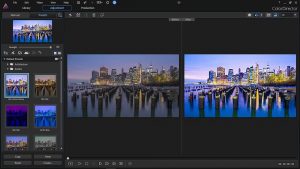
Get professional film looks with CyberLink's video color editor. Precision Color Grading. Discover a World of Light Effects. Illuminate Your Footage.
Size
244.1 MBVersion
14.0.5921.11
244.1 MBVersion
14.0.5921.11
Report this app
Description
CyberLink ColorDirector Ultra Overview
Get professional film looks with CyberLink’s video color editor. Precision Color Grading. Discover a World of Light Effects. Illuminate Your Footage. Go beyond color correction with realistic simulations of light, sparkles, or lens flares. Give your footage an authentic “aged” look. Draw focus or simulate signal loss for an instant Hollywood-esque look.
Features of CyberLink ColorDirector Ultra
- Color Splash
Isolate a color and adjust intensity to stylize your footage. - Split Tone
Adjust highlights, mid-tones, and shadows to achieve image balance and consistent style. - Craft a Consistent, Studio-Quality Look
Import and export Lookup Tables (LUTs) to change the mood and give your footage a cinematic contrast. - Match Anything
Automatically color match the grade from any reference video for a consistent look across multiple shots. - Professional Scopes
Eliminate the guesswork with tools to measure and evaluate color in an image. Be confident in your edits and ensure uniformity among shots. - Achieve Dynamic Grades With Keyframes
Manipulate colors, customize presets, and control the intensity of your effects. - AI Powered Motion Tracking
Track objects in your videos for targeted color grading. - Green Screen Maker
Turn any background or object into a customizable green screen. - Illuminate Your Footage
Go beyond color correction with realistic simulations of light, sparkles, or lens flares. - Stylize Visuals
Give your footage an authentic “aged” look. Draw focus or simulate signal loss for an instant Hollywood-esque look.
System Requirements for CyberLink ColorDirector Ultra
RAM: 2 GB
Processor: Intel® Core™ i-series (6th generation) and above
Operating System: Microsoft Windows 11, 10 (64 bit OS only, Windows 11 Arm64 is supported)
Space Required: 600 MB
What's new
Images