EasyUEFI Technician + WinPE
6.2
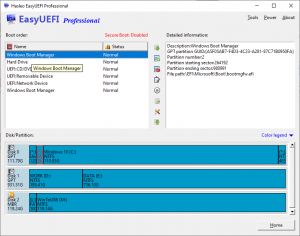
EasyUEFI owns comprehensive EFI/UEFI boot option management functions, such as create, delete, edit, clean up, backup and restore EFI/UEFI boot options, specifies an one-time boot entry for the next restart, or change EFI/UEFI boot order, all these operations done under Windows without entering BIOS setup.
Size
17.9 / 487.5 MBVersion
6.2
17.9 / 487.5 MBVersion
6.2
Report this app
Description
EasyUEFI Overview
EasyUEFI owns comprehensive EFI/UEFI boot option management functions, such as create, delete, edit, clean up, backup and restore EFI/UEFI boot options, specifies an one-time boot entry for the next restart, or change EFI/UEFI boot order, all these operations done under Windows without entering BIOS setup.
Features of EasyUEFI
- Create, Delete and Modify EFI/UEFI Boot Option
- Backup & Restore EFI/UEFI Boot Option
- Disable & Enable EFI/UEFI Boot Option
- Boot Into UEFI firmware settings (UEFI BIOS) From Inside Windows
- Specifies an One-time Boot Option
- Change EFI/UEFI Boot Sequence
- Command line support
- Backup EFI System Partition
- Restore EFI System Partition
- Recreate EFI System Partition
- Move EFI System Partition to Another Drive
- Manage EFI system Partitions
- Create Windows PE emergency disk
System Requirements for EasyUEFI
RAM: 2 GB
Operating System: Windows 7, 8, 8.1, 10 and 11
Space Required: 50 MB
What's new
Images