File Cabinet Pro
8.8.1
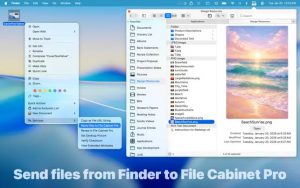
File Cabinet Pro is the file manager for the macOS menu bar. Quickly navigate to files without cluttering your desktop. Open, move, rename, compress, tag, trash, copy and paste files, all from the menu bar. You can open many file types natively in File Cabinet Pro or open files by launching other applications.
Size
20.2 MBVersion
8.8.1
20.2 MBVersion
8.8.1
Report this app
Description
File Cabinet Pro Overview
File Cabinet Pro is the file manager for the macOS menu bar. Quickly navigate to files without cluttering your desktop. Open, move, rename, compress, tag, trash, copy and paste files, all from the menu bar. You can open many file types natively in File Cabinet Pro or open files by launching other applications.
It’s easy to click into directories in icon view, drill through directories in list view, or navigate the file tree in column view.
Features of File Cabinet Pro
- TEXT DOCUMENTS
- Plain text files (txt)
- Rich Text Format (rtf)
- Rich Text Format Directory (rtfd)
- Markdown (md)
- Portable Document Format (pdf)
- IMAGE DOCUMENTS
- Portable Network Graphics (png)
- Joint Photographic Experts Group (jpeg)
- Tagged Image File Format (tiff, tif)
- Bitmap image file (bmp)
- Photoshop File Format (psd) Import only
- Scalable Vector Graphics (svg) Import only
- VIDEO/AUDIO
- -mov , -mp4 , -m4a , -m4v , -avi , -mp3 , -wav , -caf , -aif
System Requirements for File Cabinet Pro
RAM: 2 GB
Operating System: macOS 10.13 or later
Space Required: 50 MB
What's new
- Official site does not provide any info about changes in this version
Images