IObit Uninstaller Pro
15.3.0.1
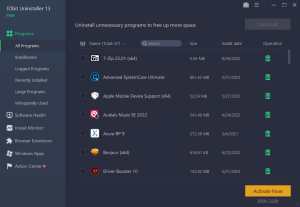
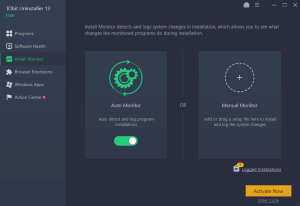
Integrated with up to date uninstall technology, IObit Uninstaller helps you remove unneeded programs easily even when Windows "Add or Remove Programs" fails. Besides removing unwanted applications, it also scans and removes leftovers easily.
Size
37.1 MBVersion
15.3.0.1
37.1 MBVersion
15.3.0.1
Report this app
Description
IObit Uninstaller Pro Overview
Integrated with up to date uninstall technology, IObit Uninstaller helps you remove unneeded programs easily even when Windows “Add or Remove Programs” fails. Besides removing unwanted applications, it also scans and removes leftovers easily. The most attractive part is that it makes a restore image before every uninstallation. With the new added Toolbars Uninstallation Module, IObit Uninstaller helps you remove unwanted toolbars thoroughly.
Features of IObit Uninstaller Pro
- Cleaner & More Stable PC
As time going on, your PC will easily become slow after piling up too many leftovers in registry after general uninstallation. But now users can remove the programs and all leftovers quickly by just 1 click in IObit Uninstaller 5; and get a cleaner, faster and more stable PC. Additionally, IObit Uninstaller 5 can also remove programs and pre-installed apps in Windows 10. - Faster & Safer Browsing
Some malicious plug-ins, toolbar and unwanted injected programs will be installed into browsers without any notice, which will frustrate you by slowing down your surfing speed and annoying ads pop-ups. The improved Toolbar & Plug-in removal will monitor and remove all these useless programs and give you fast and clean online surfing experience. And the newly enhanced Chrome plug-ins removal can remove the plug-ins not installed via Chrome store. - Powerful & Safe Uninstallation
Many stubborn programs cannot be uninstalled or uninstalled completely in an easy way. IObit Uninstaller 5 can powerfully remove them and delete all the leftovers, including the registry and file directory of some stubborn antivirus programs. IObit Uninstaller 5 will continue the unfinished uninstall process caused by system reboot; and it also can create a system restore point before every uninstallation in case of unexpected happens. - More Powerful Tools
Sometimes users will forget to remove the leftovers after uninstallation, and the new tools in IObit Uninstaller 5 can help them continuing powerful scan for the programs in the uninstall history, as well as cleaning other useless update/install package and invalid shortcuts etc. Download IObit Uninstaller 5, and you can even easily find the basic Windows Tools in it.
System Requirements for IObit Uninstaller Pro
RAM: 2 GB
Operating System: Windows XP/Vista/7/8/8.1/10/11
Space Required: 70 MB
What's new
- Upgraded uninstall engine for faster and more thorough program removal
- Enhanced silent uninstallation to be more automatic without any manual operations
- Enlarged Stubborn Program database to support removing 4000+ stubborn programs
- Optimized Software Health for deeper residual cleaning and more accurate detection of software's impact on system performance
- Added support for ARM systems
- Two skins: dark and light
- Supported 39 languages
Images





I have a problem with all applications, so I followed these steps step-by-step, and when I put the cracked file inside the Application files when I open it again two things happens first thing sometimes the app opens, but not cracked or pro pro not activated and sometimes when I open the app after putting the file it says c:%20%5CProgram%20Files%20(x86)%5C%7CObit%5C/Obit%20Uninstaller%5Cversion.dil%20is%20either%20not%20designed%20to%20run%20on%20Windows%20or%20it%20contains%20an%20error.%0ATry%20installing%20the%20program%20again%20using%20the%20original%20installation%20media%20or%20contact%20your%20system%20administrator%20or%20the%20software%20vendor%20for%20support.%20Error%20status%200xc0e90007.
Also, I made very sure I closed the application completely from the task manager and other system tray how can I resolve this?
disable your antivirus while doing the process and add the dll file in exeptions
I don’t use one. Ohh Do you mean the Windows defender? How can I disable it? Can you teach me quickly please?
search online
Yeah, I did but the windows defender is annoying some videos give steps to turn it off, but not completely or a short time. Add some videos about it says if I want to turn it off completely I need to install another antivirus. It will turn off itself then I need to turn off that other antivirus installed. That’s why I asked you.
You need to turn off real time protection under virus and threat protection settings. Also add iobit folder (C drive) in exceptions in your antivirus so that when you turn on real time protection again the file don’t get deleted
I am very sorry for bothering you, but the error still appearing on the application wouldn’t open. I did everything you told me and I did everything I know still not working. This is the error.
C: \Program Files (x86)\/Obit\/Obit Uninstaller\version.dil is either not designed to run on Windows or it contains an error.
Try installing the program again using the original installation media or contact your system administrator or the software vendor for support. Error status Oxc0e90007.
issue should have been resolved. Try uninstalling the program completely then restart your pc and install again. See if that works. if you then here’s a free license key from official site which will get you pro version for limited time: 4BF3F-95DBE-CC6E2-A3ABE
I really think you’re from the bottom of my heart for trying to help me and I’m sorry if I bothered you with the so many messages I tried everything nothing worked. I’ll leave it at that and thanks again.💔
can you open the app without replacing the dll? if yes the use the serial key i provided in the previous comment
Yes, I can open the app normally, if I don’t paste the File Umm something is weird you said to replacing should I replace a file from the application folder with the cracked one or adding the cracked file in the application folder
In short, do I only paste the cracked file or do I need to delete something then add the cracked file
Am I missing something here?
If you can open the app normally then look for an option to enter license code. Use this license key and you should be good: 2DD1D-BB696-C025B-76CBE.
This is legal license and will work for a limited period
After following the instructions it says “The code execution cannot proceed because VCRUNTIME140.dll was not found.”
Can somone help me to solve this error?
install this and then try again https://appdoze.net/microsoft-visual-c-2015-2022-redistributable/