MadPeel AI Background Remover
1.0.1
Remove backgrounds from any image.
Size
1.7 GBVersion
1.0.1
1.7 GBVersion
1.0.1
Report this app
Description
MadPeel AI Background Remover Overview
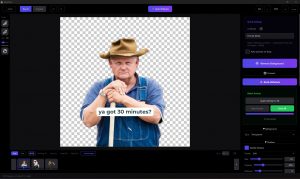
Remove backgrounds from any image. Clean up edges. Add shadows. Export for Instagram, Amazon, Etsy, or anywhere else. Remove backgrounds from any image in seconds with professional AI precision. 100% offline, 100% private. MadPeel never uploads your photos to the cloud. Everything runs locally on your PC.
Features of MadPeel AI Background Remover
- PRECISION EDITING TOOLS
- Add and Remove brush with adjustable size and hardness
- Edge refinement: sharpen, expand, contract, feather, and defringe
- Auto-Enhance analyzes your cutout and suggests optimal settings
- Undo and Redo history so you never lose progress
- BACKGROUNDS AND SHADOWS
- Transparent, solid color, gradient, or custom image backgrounds
- 12 gradient presets including Sunset, Ocean, Midnight, and Golden Hour
- 7 drop shadow presets: Soft, Hard, Floating, Grounded, Dramatic, and more
- Full control over shadow blur, opacity, distance, angle, and color
- BATCH PROCESSING
Process entire folders of product photos or headshots at once. Queue management with pause, resume, and skip controls. Auto-save completed images with organized output folders. - EXPORT ANYWHERE
22 platform-ready presets sized perfectly for Amazon, Shopify, Etsy, eBay, Instagram, TikTok, Facebook, Pinterest, LinkedIn, YouTube, and more. Export as transparent PNG, JPEG, or WebP with quality control. - GPU ACCELERATED
Automatically uses your graphics card for faster processing. Supports NVIDIA and AMD GPUs with automatic CPU fallback. - BUILT FOR PROFESSIONALS
- Drag and drop or open any PNG, JPG, WebP, BMP, TIFF, or GIF
- Before and after comparison slider and side-by-side view
- Zoom up to 10x to inspect edges at pixel level
- Keyboard shortcuts for fast workflow
- No subscriptions. No watermarks. No cloud uploads. Just results.
System Requirements for MadPeel AI Background Remover
RAM: 4 GB
Operating System: Windows 10 and 11
Space Required: 3 GB
What's new
- Performance & Stability
- Bulk-Processing Power: Prevented out-of-memory crashes during 100+ image batches.
- Instant Imports: Eliminated the 3–8 second UI freeze when dragging in large folders.
- Optimized Memory: Reduced undo/redo RAM usage by 90% using a capped, mask-only history system.
- Efficient Resource Handling: Proper GPU/VRAM cleanup when switching AI models and fixed background thread hangs. - Precision Editing Tools
- Fluid Navigation: Smooth pinch-to-zoom using high-precision Euclidean distance math.
- Pixel-Perfect Brush: Fixed the 1-pixel jitter at high zoom levels for surgical accuracy.
- Interface Stability: Resolved tool offset issues in side-by-side comparison mode. - Professional Architecture
Concurrent Processing: Full thread-safe model loading for faster, more reliable batch results
Images