Topaz Photo Pro
1.3.3
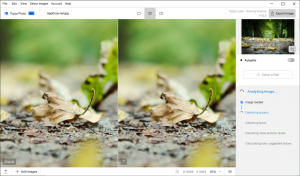
Each tool gets it closer to perfect. The ultimate finishing step for every image. Fix issues. Restore focus. Remove noise. Enhance details. Crop in. Prepare for print. Topaz Photo is the magical last step before "done." All using AI trained on millions of images.
Size
937.8 MBVersion
1.3.3
937.8 MBVersion
1.3.3
Report this app
Description
Topaz Photo Pro Overview
Each tool gets it closer to perfect. The ultimate finishing step for every image. Fix issues. Restore focus. Remove noise. Enhance details. Crop in. Prepare for print. Topaz Photo is the magical last step before “done.” All using AI trained on millions of images.
Features of Topaz Photo Pro
- Wildlife & Astro Photography
Zoom in with lossless crop, sharpen details, and denoise high ISO shots captured in unpredictable conditions. - Sports Photography
Sharpen motion blur and denoise indoor shots with poor lighting. - Events & Weddings
Never miss the important moment to low lighting or soft focus. Topaz Photo lets you fix the details without reshooting. - Archival Images
Remove dust and scratches, adjust lighting and color, and restore images to their original sharpness.
System Requirements for Topaz Photo Pro
RAM: 16 GB
Processor: Intel OR AMD Processor (2), with AVX instructions, released after 2016
Operating System: Windows 7, 8, 8.1, 10 and 11
Space Required: 50 GB
What's new
Images





not working. Can’t get past the login screen. I did everything correctly though. Any fix? Do I have to stop outbound/inbound traffic?
read the instructions carefully because license files should be pasted in ProgramData directory
There are no licences files
Those instructions were for the previous version. Current one i.e. 1.0.3 is preactivated
i pasted it. still stuck on login screen
are you sure you pasted the license file in ProgramData folder?
same. did u find any solution?
follow the instructions for current version provided. The old ones had different instructions
Thanks
Works well if the default location of the templates folder hasn’t been changed.
Otherwise, I haven’t been able to get it to work if I change the templates folder.
Note that this folder is 34 GB.