Advanced Image Studio
219.5 MBVersion
1.0.3
Description
Advanced Image Studio Overview
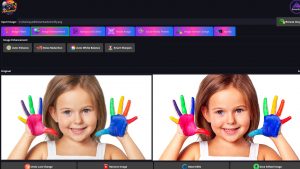
Advanced Image Studio all‑in‑one desktop tool is a powerful desktop tool designed to enhance, edit, and transform images with speed and precision. It gives you complete control over your visuals with clean background editing, intelligent enhancement filters, custom resizing, and seamless format conversion — all in one unified workspace. You can create crisp icons, prepare social‑media‑ready graphics, and fine‑tune every detail without relying on online services or cloud processing. With instant previews, drag‑and‑drop simplicity, and full offline functionality, Advanced Image Studio delivers a fast, secure, and professional editing experience. Everything runs locally on your device for maximum performance, privacy, and reliability.
Features of Advanced Image Studio
- Background Editing Suite
Remove backgrounds instantly, replace them with any image, apply solid color fills, or add soft‑to‑strong blur for a professional look. - Image Enhancement Tools
Improve photos instantly with Auto Enhance, Noise Reduction, Auto White Balance, and Smart Sharpen - Image Filters
Adjust brightness, contrast, vibrance, sharpness, and warm/cool tones with easy sliders. - Manual Resize
Resize images to any custom width and height. - Social Media Presets
Instantly resize images for Instagram, Facebook, YouTube, and LinkedIn. - Image Format Cinversion
Convert images in PNG, JPEG, or BMP formats. - Icon Generator
Create Windows .ICO files in multiple standard sizes. - Drag & Drop Support
Quickly load images by dragging them into the app - Side‑by‑Side Preview
Compare original and edited images at the same time.
System Requirements for Advanced Image Studio
RAM: 2 GB
Operating System: Windows 10 and 11
Space Required: 500 MB
What's new
- Official site does not provide any info about changes in this version
Images