Camo Studio for Mac
2.7.1
Camo enables the camera you already own to produce incredible video, whether you're meeting, streaming, or recording. Start creating great video today.
Size
96.3 MBVersion
2.7.1
96.3 MBVersion
2.7.1
Report this app
Description
Camo Studio Overview
Camo enables the camera you already own to produce incredible video, whether you’re meeting, streaming, or recording. Start creating great video today.
Features of Camo Studio
- Great video. Made easy.
Camo enables the camera you already own to produce incredible video, whether you’re meeting, streaming, or recording. Start creating great video today. - Easy to start, quick to master
Camo makes professional video accessible to every user. You can choose to get amazing video quickly with its templates and image enhancements, or get granular and creative with its full array of tools. - Stand out video, for everyone
Camo brings the power of high-quality video to a wide variety of use-cases, from filming makeup tutorials, to making sales calls, even brain surgery. - Get amazing results with any camera
Camo supports and improves video from any camera connected to your computer: phones, built-in cameras, webcams, DSLRs, action cams, and even Continuity Camera. It’s simply the best video, using any device. - Meetings. Streams. Videos. Camo does it all
Camo Studio enables the camera that you already own to produce great video whether you’re on a call or you’re streaming or simply recording your next video. - Cover every angle with Camo Camera
Plug in or go wireless with your iOS or Android device for instant high-quality video. Top-down, overhead, side angles – flex your mounts and your imagination. - Shape Your Scene to Perfection
Enhance your scene with graphics, text and even images – from branding to dynamic elements, the editor has everything you need to make every scene unique. - Stand-Out Tools
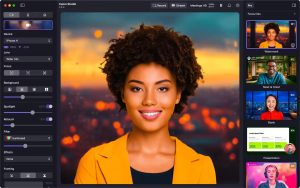
Soften or replace your background, correct your lighting, add a LUT, and then dial in perfect framing that keeps up with you – AI-powered image analysis sees to it that your video has never looked so good. - Lights, Camera, Action
One click in profiles gives you the optimal resolution, framing and aspect ratio for your video. Amazing video couldn’t be simpler: select your scene, pick a profile and start recording. - Captivate your audience through your video
Shaping your video is about more than cameras and settings adjustments – improve user engagement and inform your viewers through visual elements like lower-thirds and overlays. - Set up a scene in seconds
Configure your Personalise settings and pick one of the default scenes to get started, or create your own to match what you need. - All your content in one place
Manage your scenes, backgrounds and filters using the Gallery, and browse our curated set of content using the Explore section. - Shape every detail with our in-app editor
Compose exactly what you need, or edit existing scenes to make them just right for your next call, recording or stream. Combine text, logos, pre-made overlay elements and more in the powerful built-in scene editor.
System Requirements for Camo Studio
RAM: 2 GB
Processor: Apple Silicon or Intel Core processor
Operating System: macOS 12.3 or later.
Space Required: 200 MB
What's new
Images