Text to Speech Studio
2.0.0
Turn text into high-quality audio in seconds.
Size
602.6 MBVersion
2.0.0
602.6 MBVersion
2.0.0
Report this app
Description
Text to Speech Studio Overview
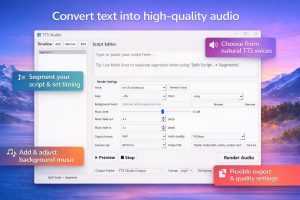
Turn text into high-quality audio in seconds. Text to Speech Studio is a powerful and easy-to-use text-to-speech application that lets you convert written text into natural-sounding audio. Whether you’re creating voiceovers, narration, or accessibility content, Text to Speech Studio gives you full control over how your audio sounds.
Features of Text to Speech Studio
- Natural Text-to-Speech Voices
Choose from a variety of high-quality voices to generate clear and realistic speech. - Background Music Support
- Enhance your audio with background music.
- Add your own music files
- Adjust volume levels
- Apply smooth fade-in and fade-out effects
- Segment-Based Timeline
- Break your script into multiple segments for precise control
- Edit individual sections of text
- Set custom delays between segments
- Create natural pacing and timing
- Preview Before Export
- Instantly preview your audio before rendering to ensure everything sounds just right.
- Flexible Export Options
Export your audio in multiple formats and quality levels to match your needs. - Automatic Output Management
Rendered files are saved to a dedicated folder on your desktop for quick access. - Perfect For
- Content creators
- Voiceover production
- Training and presentations
- Accessibility and narration
- Podcast and media production
- Privacy First
Text to Speech Studio processes your content locally whenever possible. Your text and audio files are not collected or stored by the application. - Simple, Clean, and Powerful
Designed with a clean interface and intuitive workflow, TTS Studio makes it easy to go from script to finished audio in minutes.
System Requirements for Text to Speech Studio
RAM: 4 GB
Operating System: Windows10 and 11
Space Required: 1.5 GB
What's new
- Official site does not provide any info about changes in this version
Images