VideoClipCutter
1.0.1
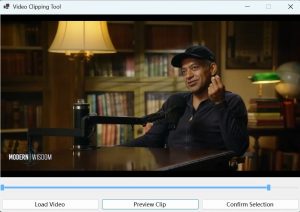
Easily extract any part of a video with VideoClipCutter – the lightweight, no-nonsense tool that lets you cut, trim, and save video clips in seconds.
Size
227.7 MBVersion
1.0.1
227.7 MBVersion
1.0.1
Report this app
Description
VideoClipCutter Overview
Easily extract any part of a video with VideoClipCutter – the lightweight, no-nonsense tool that lets you cut, trim, and save video clips in seconds. Perfect for creators, students, teachers, and anyone who wants to quickly grab a moment from a video – **100% offline, no internet required, no data uploaded.
Whether you’re editing a home video, saving a highlight from a tutorial, or sharing a funny clip with friends, **VideoClipCutter** makes it fast and frustration-free.
Features of VideoClipCutter
- Trim & Cut Any Video
Select start and end times with precision. Extract the exact segment you want. - Supports Popular Formats
Works with MP4, AVI, MKV, MOV, WMV, FLV, and more – no conversion needed. - Zero Quality Loss
Save clips in original quality or choose custom resolution (HD, Full HD, etc.). - Batch Processing
Cut multiple clips from one video – save time when editing highlights. - Fast & Lightweight
Built for Windows 10/11. Runs smoothly even on older PCs. - 100% Offline & Private
No cloud, no tracking, no ads. Your videos stay on your device – safe and secure.
System Requirements for VideoClipCutter
RAM: 2 GB
Operating System: Windows 10 and 11
Space Required: 500 MB
What's new
- Official site does not provide any info about changes in this version
Images