WinToUSB (All Editions)
10.8.1.2
WinToUSB is the best Windows To Go Maker that allows you to install and run Windows operating system on a USB hard drive or USB flash drive, using an ISO image or CD/DVD drive as the source of installation.
Size
61.1 / 64.6 MBVersion
10.8.1.2
61.1 / 64.6 MBVersion
10.8.1.2
Report this app
Description
WinToUSB Overview
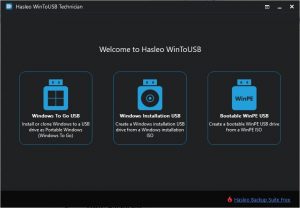
WinToUSB is the best Windows To Go Maker that allows you to install and run Windows operating system on a USB hard drive or USB flash drive, using an ISO image or CD/DVD drive as the source of installation. Starting from version 2.0, you can clone current Windows OS installation (Windows 7 or later) to a USB drive as a Windows To Go Workspace. WinToUSB also supports creating a bootable WinPE USB drive, it can help you transfer the contents of WinPE to a USB drive and make the drive bootable.
Features of WinToUSB
- Easy-to-use wizard interface that provides step-by-step instructions for creating a Windows To Go USB drive.
- Creation of Windows To Go from an ISO image file or CD/DVD drive.
- Clone an existing Windows OS (Windows 7 or later) to a USB Drive as a Windows To Go Workspace.
- Use of a Non-Enterprise Edition of Windows 10/8.1/8/7 to create Windows To Go Workspace.
- Creation of Windows To Go on Non-Certified Windows To Go USB Drive.
- Clone current Windows OS (Enterprise edition of Windows 10/8.1/8/7) to a USB drive as a Windows To Go Workspace
- Clone current Windows OS which on a dynamic disk to a USB drive as a Windows To Go Workspace
- Clone current Windows OS which on a USB disk (Windows To Go USB drive) to other USB drives as a Windows To Go Workspace
System Requirements for WinToUSB
RAM: 2 GB
Operating System: Windows 7, 8, 8.1, 10 and 11
Space Required: 100 MB
What's new
Images