DaVinci Resolve Studio 21
9.6 GBVersion
21.1
Description
DaVinci Resolve Studio Overview
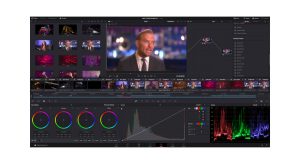
DaVinci Resolve Studio supports up to 120fps at a massive 32K resolution, as well as support for multiple GPUs for real time playback of professional 10-bit formats, and accelerated H.264 and H.265 hardware decoding and encoding. There’s a full suite of immersive audio tools, DaVinci Neural Engine AI voice isolation, music remixer and dialogue separator. It also includes Dolby Vision and HDR10+ grading and rendering, and 45 extra Resolve FX such as AI UltraNR noise reduction, SuperScale and de-interlacing. You also get workflow and media asset management integration, remote scripting API, and rendering and encoder plug-in support. Plus there’s full screen playback on a second monitor!
Features of DaVinci Resolve Studio
- More GPU Acceleration
DaVinci Resolve Studio turbo charges your system’s GPU performance! Fully optimized for Metal and Apple Silicon unified memory GPUs on a Mac, or OpenCL and CUDA on Windows and Linux, plus you’ll get incredible performance gains with additional GPUs. - Advanced Noise Reduction
DaVinci Resolve Studio includes some of the most powerful and sophisticated noise reduction. Temporal and AI spatial noise reduction tools can be used independently or together to help clean up and remove unwanted noise in virtually any image. - Lens Distortion
DaVinci Resolve Studio includes a lens correction feature that allows you to analyze a clip and correct for spherical lens distortion or other aberrations. It uses optical flow image analysis and processing algorithms for incredible quality results! - Professional HDR Scopes
The HDR scopes in DaVinci Resolve Studio are capable of measuring and providing detailed information about ST.2084 and HLG images. This allows you to replace the 10‑bit scale of the scopes with a scale based on nit values, or cd/m2, instead. - Stereoscopic 3D
DaVinci Resolve Studio features a complete set of tools for editing and grading stereoscopic 3D projects. You have total control over stereo specific clip properties such as convergence, floating windows, eye alignment, mastering and output. - Remote Monitoring and Grading
Remote monitoring allows clients to view a real time feed via computer, iPad or iPhone with extreme high quality! Remote grading lets you work interactively so that changes made on your DaVinci Resolve system are immediately visible remotely. - DaVinci Color Transform Language
Unlike LUTs, which rely on simple lookup tables, DaVinci color transformation scripts are GPU accelerated bits of code that directly transform images using combinations of math functions. That makes them extremely fast and non destructive. - Scripting and Automation
DaVinci Resolve Studio features support for both Python and LUA scripting, along with developer APIs that allow you to add workflow integrations and custom encoding options. This lets studios of all sizes create deeply integrated custom workflows. - Workflow Integration Plug‑ins
DaVinci Resolve Studio supports workflow integration plug-ins for connecting to local and remote asset management, automation systems and more. Users can write their own plug-in and interact with DaVinci Resolve’s JavaScript APIs.
System Requirements for DaVinci Resolve Studio
RAM: 16 GB of system memory
Operating System: Windows 10 Creators Update or later
Space Required: 20 GB
Blackmagic Design Desktop Video 10.4.1 or later
Integrated GPU or discrete GPU with at least 2 GB of VRAM
GPU which supports OpenCL 1.2 or CUDA 11
NVIDIA/AMD/Intel GPU Driver version – As required by your GPU
What's new
Images



Hi, the R2R emulator link is no longer available. Do you have any alternatives? Thanks for your work and being there!
link is available and working on our end
“R2R Emulator” link leads to “IObit Uninstaller Pro”, is that correct?
link is fixed.
This should be in Windows category.
fixed. thanks for the heads up
The patch dont work on 21.1
use this: https://onefiles.net/6bf57d338388a365
I installed everything according to the instructions, but when I launch DaVinci Resolve Studio, it still asks me for a license key. What could be the problem?
use this: https://onefiles.net/6bf57d338388a365
i followed the installation and its still asking for a key? when i pasted the patches in the directory they didn’t ask to be replaced???
use this: https://onefiles.net/6bf57d338388a365
It seems that the DVR universal memory patcher v1.2 does not function on Davinci resolve 21.1.
use this one: https://onefiles.net/6bf57d338388a365
but that’s IOb uninstaller pro app link
fixed
it doesn’t work, i followed all the steps and tried in a clean system but it keeps asking for activation key
new crack added in download links named R2R Emulator
and i did exactly what was in the instructions but it still asks for license key. please help
new crack added in download links named R2R Emulator
The recent 21.1 update doesn’t work, it’s asking for a license key. Installed it and replaced the .dll files multiple times, and nothing worked.
new crack added in download links named R2R Emulator
Thanks for the new release, i also got asked for license key or login to cloud. Reinstalled three times and followed the instructions, deleted everything, even AppData. Downloaded the emulator (DVREMU) from version 20 and updated, worked like a charm. If others have the same issue, iv used version 20 from appdoze before.
I finally figured out how to get it to work!!
before you do anything, in the DVR Universal Memory Patcher V1.2-panospc folder, rename intl.dll to intl-8.dll and then proceed with the installation normally, and it should work!
this worked for me, thanks. I haven’t used the ai tools yet though.
thank u bro, u save my life
Thanks dude it works
bro can u help me find the license key
follow the instructions and you won’t need any key
will my current projects in davinci 20 be deleted if i uninstall it and install davinci 21?
no they shouldnt be
I’ve been waiting for this… THANK YOUUUU
Installed perfect in a clean system!
If an older or beta version is installed, should remove it before installing this one?
ThanX
if i got the old version do i need to delet it to instal this of i cand instal it and will update the old version ?
uninstall previous one and then install this one
does this work on Mac and how to get past the mellware notification when it says I should move it to the bin
this one is not for mac. we will upload the one for mac soon
Finally
Where can i find needed DVR Universal Memory Patcher V1.2-panospc?
it’s there in the archive
This version Stable?
yeah
I’m currently having Davinci Resolve Studio 20. Do I need to uninstall this version and install Davinci Resolve Studio 21?
it is always recommended to uninstall any previous version before installing new one