Offline Subtitle Studio AI
1.3 GBVersion
1.0.3
Description
Offline Subtitle Studio AI Overview
Offline Subtitle Studio AI – 100% offline AI subtitles for any video or audio — generate, edit, style, export to SRT/VTT/TXT/ASS, or burn in. Your media never leaves your PC. Offline Subtitle Studio AI turns your videos and audio into clean, editable subtitles using on-device AI speech recognition powered by faster-whisper. Everything runs locally on your PC, so your files stay private.
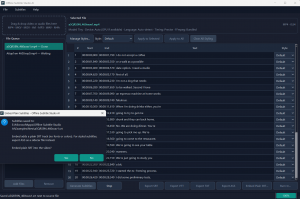
Drag in a file, generate captions, fine-tune timing and text in an editable cue table, apply ASS style presets, then export to SRT, VTT, TXT, or styled ASS — save a sidecar file that loads automatically in players like VLC, embed a subtitle track, or burn styled subtitles into a new video (your original is never modified). A compact model is bundled for fully offline first use; optional larger models (Base, Small, Medium, Large-v2) download once from Hugging Face, then run offline. CPU by default with optional NVIDIA GPU (CUDA) acceleration. One-time purchase — no subscription, no ads, no account.
Features of Offline Subtitle Studio AI
- Offline AI Subtitle Generation
Create subtitles from video or audio files using local speech recognition on your Windows PC. - Private Local Processing
Your videos, audio files, transcripts, and subtitles stay on your computer. - Editable Subtitle Timeline
Review generated cues, adjust start and end times, edit text, and clean up captions before export. - Export to Popular Subtitle Formats
Save subtitles as SRT, VTT, TXT, or ASS for editing, sharing, archiving, or use in video players and editors. - Styled Subtitles with ASS
Create subtitle styles with font, size, color, outline, position, and formatting presets. - Burn Subtitles Into Video
Render styled subtitles permanently into a new video file while keeping the original file unchanged. - Embed Subtitle Tracks
Add selectable subtitle tracks to compatible video files for a cleaner viewing workflow. - Batch Processing
Queue multiple audio or video files and generate subtitles in sequence. - Works with Common Media Files
Supports popular video and audio formats such as MP4, MKV, MOV, AVI, MP3, WAV, and M4A.
System Requirements for Offline Subtitle Studio AI
RAM: 4 GB
Operating System: Windows 10 and 11
Space Required: 3 GB
What's new
- Official site does not provide any info about changes in this version
Images